TUI Reference
Keyboard shortcuts and panel layout.
Layout
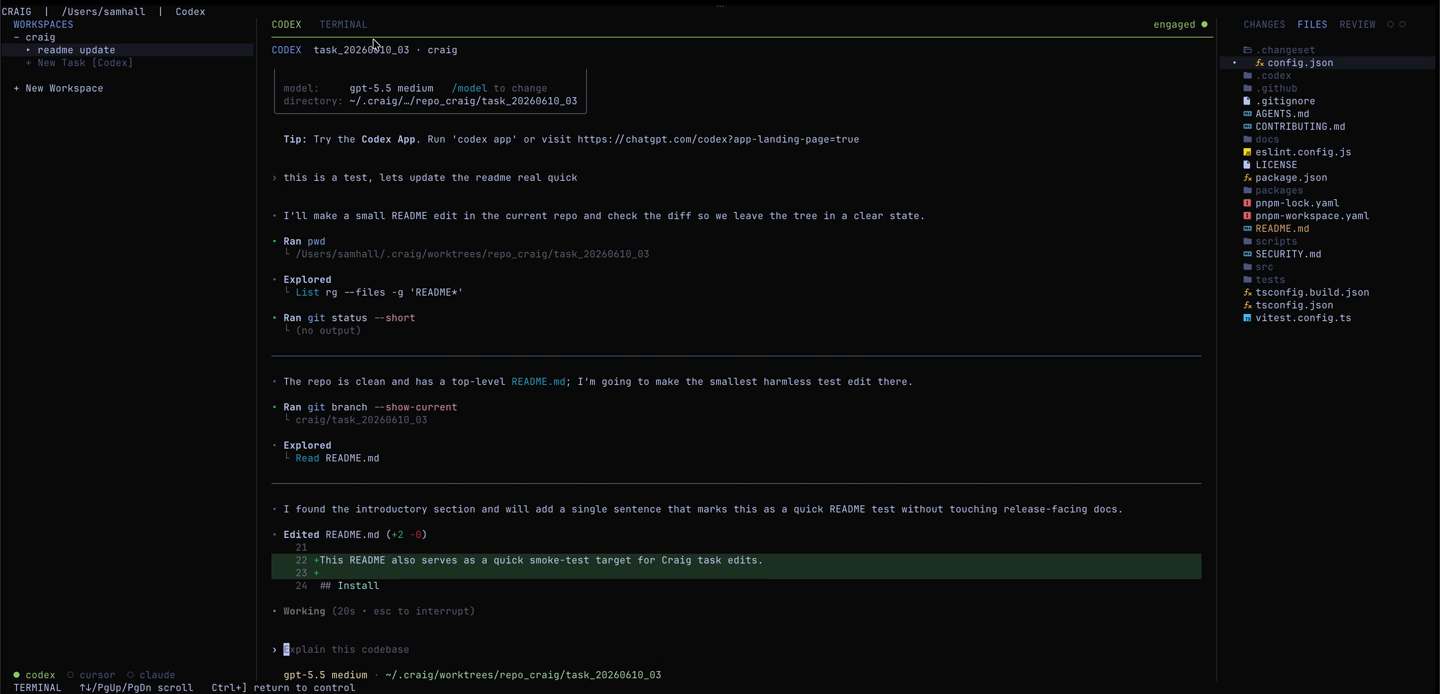
Craig's TUI has three zones: a left panel for repo and task navigation, a center area with tabbed agent and terminal views, and a right inspector with Files and read-only Review modes.
Global shortcuts
| Key | Action |
|---|---|
| ? | Show help |
| Esc | Open pause menu |
| Tab / ] | Move focus forward |
| Shift+Tab / [ | Move focus backward |
| ↑↓ / j k | Move the focused selection |
| PgUp / PgDn / wheel | Scroll focused inspection content |
| z | Zoom the center panel |
| n | Start a new task prompt |
| q | Quit the foreground TUI; daemon-owned sessions keep running |
Tasks panel (left)
| ↑↓ / j k | Navigate workspaces and tasks |
| Enter on + New Task | Open the task prompt |
| Enter on + New Workspace | Open the workspace browser |
| Enter on task | Attach the selected task PTY |
| r on + New Task | Cycle the runner for the next task |
| X on task | Close the selected task |
| X on workspace | Remove the selected workspace when it has no task records |
Center panel
| ← → / h l | Switch tabs |
| + | Create the preferred tab kind |
| a | Agent tab |
| t | Terminal tab |
| r | Cycle the runner for the next agent tab |
| x | Close tab |
| Enter | Attach PTY |
Inspector panel (right)
| ↑↓ / j k | Navigate |
| ← → / h l | Switch mode (Files / Review) |
| / in Files | Search the file tree |
| Enter in Files | Open the selected file or collapse/expand a directory |
| Enter in Review | Open the selected diff or run the selected action |
| o in Review | Open the tracked pull request in your browser |
| R in Review | Refresh read-only PR/check state |
| X in Review | Close the task record |
Terminal mode
| Ctrl+] | Return to control mode |
| PgUp / PgDn / wheel | Scroll terminal history |
| ↑↓ while scrolled back | Continue moving through terminal history |
Task prompt
While entering a new task, Ctrl+R cycles runners, Enter creates the task, and Esc cancels. Craig transitions directly into the new agent session. The entered text becomes Craig task metadata; it is not sent to the agent PTY.
Workspace browser
The workspace browser uses ↑↓ or j k to move, → or l to open a directory, ← or h to go up, / to search, Enter to add the selected path, and Esc to clear search or cancel.
Review mode
Review mode is read-only — check PR state, CI status, and comments here. Run checks, commit, push, or merge from the agent PTY.
Pause menu
Press Esc from control mode to pause. Agents keep running. Options lets you enable or disable runners, edit runner executable paths, toggle feature previews, and inspect Craig's logs.